Unity MCP — AI Co-Pilot for Unity 2022.3+ and Unity 6
What is Unity MCP? Unity MCP is an enterprise-grade Model Context Protocol plugin that runs inside the Unity Editor. It exposes 20+ intent-level tools covering 113 atomic operations to Claude Desktop, Claude Code, Cursor, Windsurf, Cline, and other MCP clients. Supports Unity 2022.3+, Unity 6, and ships an 11-language UI on Windows, macOS, and Linux.
Tool surface
- GameObject — create, find, delete, batch property writes, hierarchy snapshots.
- Component — add/remove, get/set properties, UnityEvent binding.
- Scene — create/open/save scenes, snapshot, switch.
- Prefab — create, instantiate, apply/revert overrides, unpack instances.
- Materials & shaders — create materials, set properties, bind to renderers.
- Editor — menu items, selection, project settings, Play mode, console.
- Animation — Animator, AnimatorController, AnimationClip.
- Knowledge base — UI rules, layout patterns, anchor presets.
- Validation & debugging — missing scripts, duplicate names, texture audit, dynamic screenshot verification, test runner.
Versus alternatives
GitHub Copilot only completes code; Unity MCP also operates the editor. Unity Muse / Sentis is Unity's first-party AI with a fixed model set; Unity MCP plugs into any MCP-aware client (Claude 4.x, GPT-5, Gemini) with the same toolset.
Install
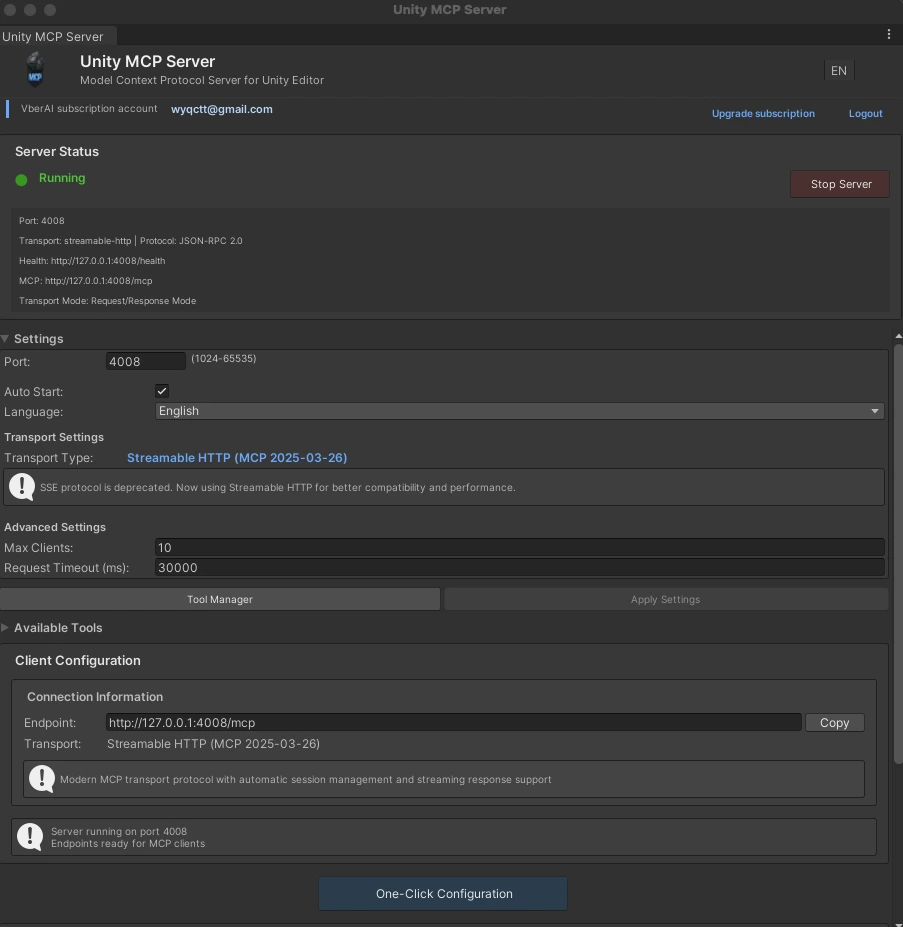
Install via Package Manager → open Window → Unity MCP → Start Server → use the one-click config wizard to add Claude Desktop / Cursor / Windsurf / Cline.
License
Free trial after install, monthly and yearly subscriptions, or permanent license (current version forever, limited availability). 7-day offline window after first online activation.
Data handling
Project content is read only as an operation needs it, and edits are applied on the machine. MCP does not proactively upload project source or assets to VberAI servers; whether tool results are sent to the cloud depends on the AI client and model. Login credentials stay in the local user directory; account and license checks require a network connection.
20+ intent tools, 113 operations, 11-language UI, 12 modules: GameObject, components, scenes, Prefabs, materials and shaders, textures, assets and project, editor control, scripts and code, UI and animation, package management, knowledge base, validation and debugging. Unity 2022.3+ and Unity 6. Windows, macOS, and Linux. VberAI account sign-in or activation code; free trial and paid licenses.